


Download Postimage – Free, Secure Screen Capture Tool for Windows, Mac, Android & iOS
Postimage is a lightweight, intuitive screen capture tool designed for users who need quick and efficient ways to capture, edit, and share screenshots. Whether you're a student, content creator, or professional, Postimage simplifies the process of capturing your screen with minimal effort. The software supports full desktop captures, selective region selection, and even automatic clipboard integration, allowing you to paste your screenshots instantly into emails, documents, or social media. With its clean interface and fast performance, Postimage is ideal for anyone seeking a reliable alternative to built-in tools like Snip & Sketch or the macOS screenshot utility. While still in early development, Postimage delivers solid functionality and a promising foundation for future updates.
Key Features of Postimage – Why It Stands Out
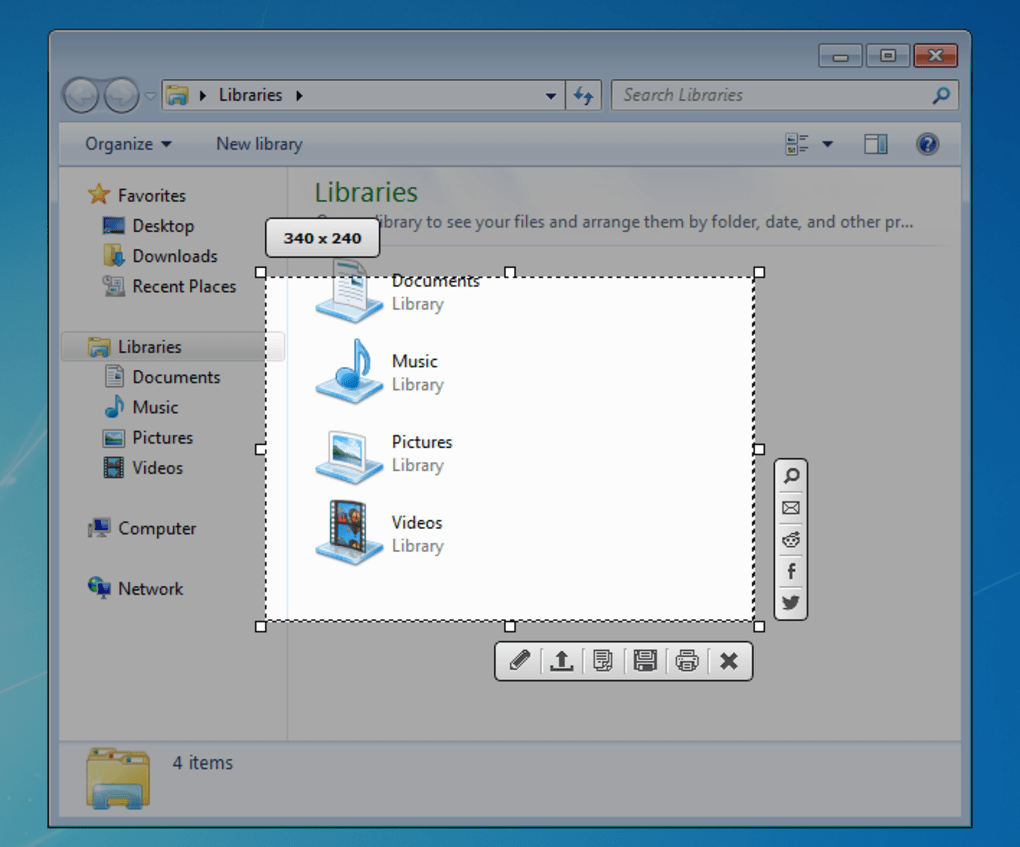
Postimage brings a fresh approach to screen capture with a suite of features that prioritize speed, simplicity, and sharing. One of its standout capabilities is the ability to capture your entire screen or a custom region with just a few clicks. The tool allows you to manually adjust the captured area after the shot, giving you full control over cropping and framing without needing external editing software. This is particularly useful when you're preparing visuals for tutorials, presentations, or online content.
Another powerful feature is the automatic clipboard integration. Once a screenshot is taken, Postimage can instantly send the image to your clipboard, enabling seamless pasting into applications like Microsoft Word, Google Docs, or messaging platforms. This eliminates the need to navigate file folders or manually save and open images, significantly boosting productivity.
Postimage also supports direct online sharing. After capturing an image, you can upload it instantly to a secure cloud server and receive a shareable link. This is perfect for remote teams, educators, or anyone who needs to send visual feedback quickly. The tool also allows you to save images locally in popular formats like PNG, JPG, and BMP, ensuring compatibility across devices and platforms.
For users who prefer automation, Postimage offers customizable hotkeys, so you can trigger captures with a single keystroke. Whether you're using Windows, Mac, Android, or iOS, the app adapts to your workflow. With its minimalistic design and focus on core functionality, Postimage avoids clutter and delivers a distraction-free experience. Although still in early development, the roadmap includes advanced editing tools, cloud sync, and AI-powered cropping—making it a tool to watch for in the coming months.
How to Install and Use Postimage on Windows, Mac, Android, and iOS
Downloading and installing Postimage is a straightforward process, whether you're on Windows, Mac, Android, or iOS. To get started, visit the official Postimage website and select the version that matches your device. The software is completely free to download and use, with no hidden fees or subscription models. For Windows and Mac users, simply download the installer file, run it, and follow the on-screen instructions. The installation is quick—usually under 30 seconds—and requires no administrative privileges, making it ideal for both personal and office use.
Once installed, launch the app to access the main interface. The dashboard is clean and intuitive, featuring a central capture button and options for full-screen, window, or custom region captures. To take a screenshot, click the capture button and drag your cursor to select the desired area. After the capture, you can immediately crop, annotate, or adjust brightness and contrast using the built-in editor.
For Android and iOS users, Postimage is available via the Google Play Store and Apple App Store. After downloading, grant the necessary permissions (such as access to storage and camera), and you're ready to go. The mobile version supports touch gestures for capturing and editing, making it perfect for on-the-go use. You can also use the mobile app to capture app screens, social media posts, or even QR codes.
Postimage also supports cross-device syncing through a free cloud account. After signing in, your screenshots are automatically backed up and accessible from any device. This feature is especially useful for users who switch between desktop and mobile throughout the day. The app updates regularly with bug fixes and new features, so it's recommended to enable automatic updates to stay current.
Pros and Cons of Using Postimage – Honest Review
- Pros:
- Free to download and use with no watermarks or ads
- Lightweight and fast, with minimal system resource usage
- Supports multiple platforms: Windows, Mac, Android, iOS
- Automatic clipboard integration for instant pasting
- Direct online sharing with secure upload links
- Customizable hotkeys for quick access
- Simple, clutter-free interface ideal for beginners
- Regular updates with new features and bug fixes
- Cons:
- Still in early development—some bugs may occur
- Limited advanced editing tools compared to competitors
- Cloud storage is free but limited in capacity
- Mobile app lacks some desktop features (e.g., region resizing)
- No built-in OCR or text recognition for images
Frequently Asked Questions (FAQ)
-
Is Postimage free to download and use?
-
Postimage offers a fully free version with core features like screen capture, clipboard integration, and direct sharing. While premium features may be added in future updates, the current version remains ad-free and accessible to all users.
-
Can I use Postimage on both Windows and Mac?
-
Whether you're using Windows 10/11 or macOS Big Sur and later, Postimage provides dedicated installers for optimal functionality. The interface is consistent across both platforms, ensuring a familiar experience.
-
Does Postimage support mobile devices?
-
The mobile apps are designed for touchscreens and include gesture-based capture, instant sharing, and cloud backup. They’re ideal for capturing app screens, social media content, or quick notes.
-
How do I share a screenshot directly from Postimage?
-
Postimage uses encrypted connections to ensure your images are secure during upload. The link expires after a set period (configurable in settings) for privacy protection.
-
Is Postimage secure when uploading screenshots?
-
Privacy is a priority. Uploaded images are not stored permanently and are automatically removed after 7 days unless you choose to keep them. This ensures your sensitive data remains protected.
Final Verdict: Is Postimage Worth Downloading?
Postimage is a promising, free screen capture tool that combines speed, simplicity, and cross-platform compatibility. While it’s still in early development and may have occasional bugs, its core features—like instant clipboard sharing, direct online upload, and customizable hotkeys—make it a strong contender for users looking for a lightweight alternative to built-in tools.
For students, remote workers, and content creators, Postimage streamlines the screenshot workflow without sacrificing performance. Its clean interface and minimal learning curve make it accessible to beginners, while its future roadmap suggests exciting enhancements like AI editing and cloud sync.
If you're searching for a secure, free, and easy-to-use screen capture tool that works seamlessly across Windows, Mac, Android, and iOS, Postimage is definitely worth a try. Download it today and experience faster, smarter screenshot management.
Download Postimage now and elevate your digital workflow with a powerful, free, and secure screen capture tool.







